
A year ago, I was working on a project that I realized was the perfect use for macOS’s Automator: not a shell script, not AppleScript, but Automator. As I dove into it, I realized how many features and actions it had that Shortcuts still lacks. Some of these include:
- Ask For Servers
- Apply SQL
- Get Connected Devices
- Get Attachments From Mail Messages
- Watch Me Do
Automator is a powerful tool that has been around for a long time, but it is often overlooked in favor of Shortcuts.
Background
Following the discovery of the vulnerability in AdGuard for Safari, I was looking for additional vulnerabilities and oversights in macOS file access control. One of the folders I focused my research on was the user Caches folder located at ~/Library/Caches.
This folder is a goldmine for security researchers. It is a folder that is used to store temporary files that are used by applications. It is also a folder that is often overlooked by users and developers alike. While it primarily just stores SQL databases for web requests, some developers also store other sensitive data.
Another important thing to know about this folder is that it is notably not protected like an application’s Container folder is. This means that any unsandboxed application can read or write to any file in this folder.
The Discovery
While looking through the Caches folder, I noticed three files that stood out to me:
com.apple.automator.actionCache-bundleLocations.plistcom.apple.automator.actionCache-system-standardLocations.plistcom.apple.automator.actionCache-user-standardLocations.plist
After playing around with these files, I realized that Automator fully trusted these files as the source of truth for application behavior without checking it. Looking further, I became interested in the com.apple.automator.actionCache-system-standardLocations.plist file in particular.
Here is a stripped down version of the file:
<?xml version="1.0" encoding="UTF-8"?>
<!DOCTYPE plist PUBLIC "-//Apple//DTD PLIST 1.0//EN" "http://www.apple.com/DTDs/PropertyList-1.0.dtd">
<plist version="1.0">
<dict>
  <key>cacheLocationList</key>
  <array>
    <string>/System/Library/Automator</string>
  </array>
  <key>languages</key>
  <array>
    <string>en-US</string>
    <string>he-US</string>
  </array>
  <key>/System/Library/Automator</key>
  <dict>
    <key>actions</key>
    <dict>
      <dict>
        <key>BundlePath</key>
        <string>/System/Library/Automator/Copy Finder Items.action</string>
        <key>BundleIdentifier</key>
        <string>com.apple.Automator.CopyFiles</string>
        <key>AMName</key>
        <string>Copy Finder Items</string>
        <key>NSPrincipalClass</key>
        <string>CopyFilesAction</string>
        <key>AMIconName</key>
        <string>Finder</string>
        <key>AMIconPath</key>
        <string>/System/Library/CoreServices/Finder.app</string>
        <key>AMDescription</key>
        <dict>
          <key>AMDSummary</key>
          <string>This action copies the specified Finder items to the specified location.</string>
        </dict>
        <key>AMApplication</key>
        <array>
          <string>Finder</string>
        </array>
        ...
      </dict>
    </dict>
  </dict>
</dict>
</plist>
The Exploit
Importantly, I realized that this file was the first used source of truth for Automator’s actions and that it was not checked against the actual file system. This meant that I could change the path of a system action to point to a malicious action in an attacker controlled directory and Automator would just replace the action in both the sidebar and the workflow editor. A true bait and switch.
This meant that adjusting this file would change the behavior of previously made workflows, even if I didn’t have write access to the original action’s directory and never re-opened the workflow in automator.
To make matters worse, an action can use whatever icon it would like, which means that it can perfectly impersonate a system action and run with the same level of trust the user would typically grant.
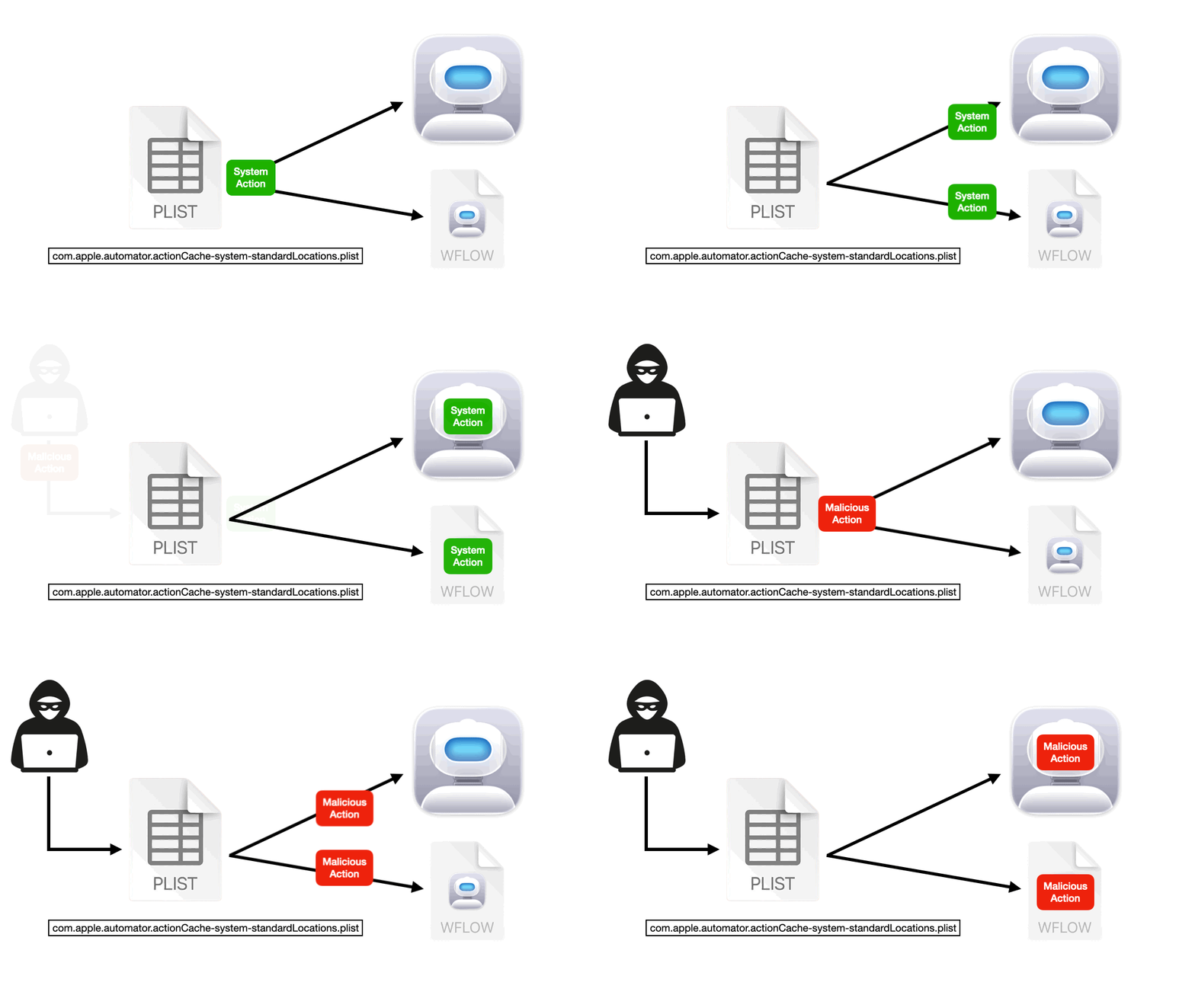
A Massive Catch
However, there was one massive catch. Automator still checks these falsified actions against the actual file system for the signature. This means that swapped actions will show a non-Apple signature and will not run if the user has not enabled 3rd Party Actions in Automator. This setting is disabled by default.
No Resolution
I reported this vulnerability to Apple last year, on March 13th, 2025. It was quickly reproduced and acknowledged by the security team. Following months of back and forth, Apple has ultimately notified me that they will not be addressing this vulnerability for three primary reasons:
- Automator is a deprecated application and is being phased out in favor of Shortcuts.
- The vulnerability requires the user to have 3rd Party Actions enabled in Automator, which is a setting that is disabled by default.
- The simple solution fix of changing the directory would directly conflict with the way normal 3rd party actions are supposed to work.
I understand the logic and why they have chosen not to address this vulnerability. It is still a fascinating look into how macOS handles permissions and trust.
However, Apple was kind enough to still allow me to publish about this vulnerability and I am grateful for that. Because this is an active vulnerability, I will not be sharing a POC as that would make it even easier to exploit.